One calm place for a coaching week: see who needs you, review each client's week, notice what lines up, and send guidance that reaches them — on the data each client chooses to share.
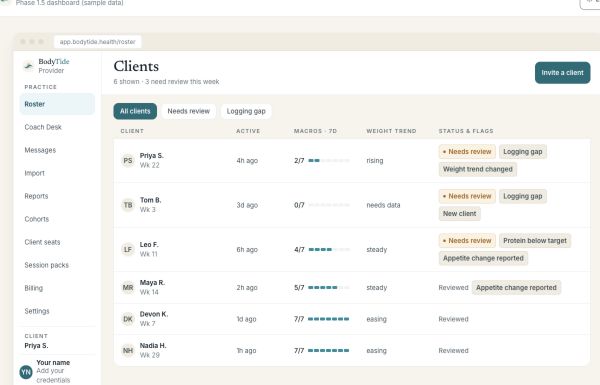
The roster reads at a glance: who has been active, who has a question waiting, whose messages are unread, who just connected — plus one flag worth your attention, Check in on intake, when a client's own answers suggest they may not be eating enough. The Coach Desk gathers everything your clients wrote — questions, notes, wins, weekly reflections — into a single queue you can work through, defer, or mark handled.
The roster — your morning, at a glance
Review
Review the week, not a pile of screenshots.
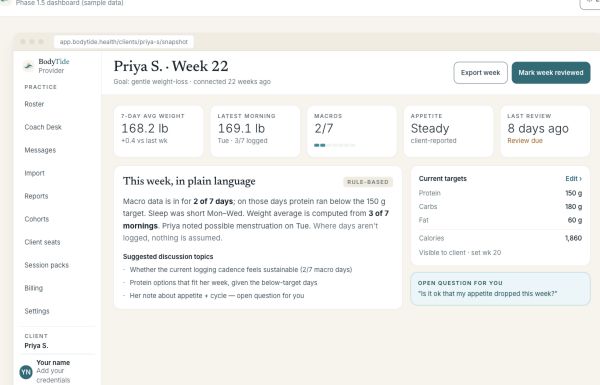
Every client gets a Monday-to-Sunday grid: macros against the targets you set, weight, sleep, steps, cycle days, meals out. Averages use logged days only — a day that wasn't logged is never counted as a zero — and every number says where it came from. A multi-week Program ledger lays out target vs. actual by week, 4-week block, or month.
One client's week, in plain language
Notice
See what lines up.
Trends show weight as a weekly trend with a band that is honest about its uncertainty, same-phase comparisons for cycling clients — so a luteal reading is compared to luteal readings — and context overlays like sleep, activity, and meals out, with the strongest associated factor named directly, r and n included. Appetite-affecting medication appears as context only, never interpreted. Association, never cause.
Guide
Coach with words that reach them.
Set versioned macro targets your client acknowledges in their app. Choose their check-in cadence. Recommend practices from the shared library or your own. Answer pinned questions, message asynchronously, and send one weekly note that lands on their Today screen.
Built for how you already work
Your practice comes with you.
Bring your spreadsheets
Upload the tracker you already use. Entries import directly for the clients you manage off-app, and are staged for the client's own review when they use BodyTide themselves.
One invite for your whole practice
One practice code covers any number of clients — text it, email it, or print the QR. Each person appears in your roster once they accept.
A summary you can hand over
Print or save a fixed weekly summary — targets vs. actuals, data completeness, notes, wins, and intentions — ready for a session or your records.
The numbers stay honest
Built so you never look uninformed in front of a client.
Logged days only
Averages are computed from the days a client actually logged. A missing day is missing — never a zero, never a miss.
Consent, stated plainly
You see the categories each client shares, read-only, and the dashboard says "not shared" where one isn't — so an empty row never reads as an inactive client.
Operational, never moral
The one amber flag is "Needs review" — a workflow state about your week, not a judgment about any client's data.
Where BodyTide stops
Descriptive by design.
Everything you see is read-only on the client's record, and everything BodyTide says is descriptive — it summarizes what clients report. It does not diagnose, treat, prevent, or manage any condition, and clinical decisions remain yours.